

Intro
The DomoStats Connector allows you to explore how your team is using Domo. Learn about your team’s activities, Projects and Tasks, DataSets, Buzz conversations, and more to find insights and shape your company’s Domo experience. You must have an Admin security role to access the DomoStats Connector or to connect to the DomoStats apps. However, after the DataSets have been created or the app has been deployed, they can be shared with anyone in your organization. You import DomoStats DataSets into the Data Center. This topic discusses the fields and menus that are specific to the DomoStats Connector user interface. General information for adding DataSets, setting update schedules, and editing DataSet information is discussed in Adding a DataSet Using a Data Connector.Prerequisites
To pull in DomoStats DataSets using this Connector, you must have the Admin default security role.Connecting to DomoStats DataSets
This section enumerates the options in the Details pane in the DomoStats Connector page. The components of the other panes in this page, Scheduling and Name & Describe Your DataSet, are universal across most Connector types and are discussed in greater length in Adding a DataSet Using a Data Connector.Details Pane
This pane contains a single Report menu from which to select your desired DomoStats DataSet. See the list of available reports below.Other Panes
For information about the remaining sections of the connector interface, including how to configure scheduling, retry, and update options, see Adding a DataSet Using a Data Connector.Locating DomoStats DataSets
After a DataSet is created, you can locate the DataSet through filters and tagging. This helps keep DataSets organized and accessible.- In the navigation header, select Data.
-
Select DataSets from the
 navigation rail.
- In the Search bar, type the name of your DataSet. You can also locate DataSets using filters.
- In the Search bar, select Add Filter.
- Choose Type and enter DomoStats.
Tagging a DomoStats DataSet
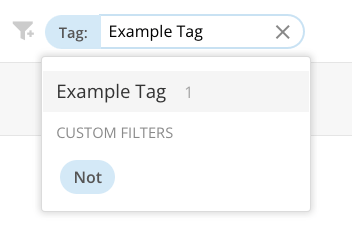
Locating and organizing your DataSets is made possible by tagging. Tagging groups the DataSets in collections that can be found using the Tag filter.- Locate the DataSet in Domo. (See the previous section, Locating DomoStats DataSets, for a step-by-step guide.)
- Select + Add Tag under the DataSet’s name.

- Choose from the list of available tags, or create a new tag using the search feature.
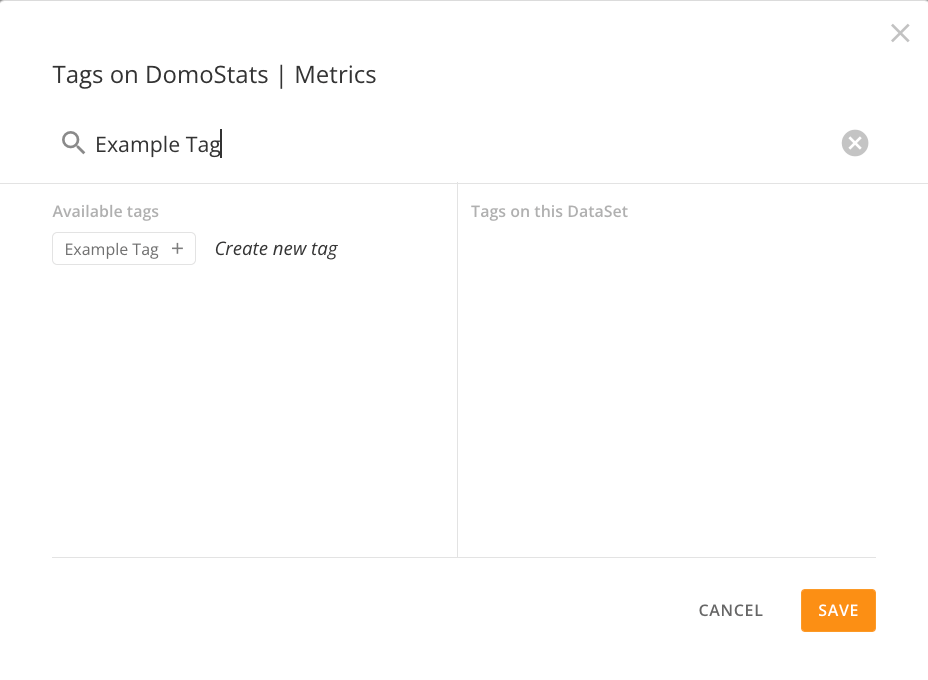
- Select + next to Create new tag.
- Select Save.

DataSet Fields
This section provides field-by-field descriptions for specific DomoStats report DataSets. For additional reference, see DomoStats reports DataSets.Accounts
Note: Field-level schema for the Accounts report is forthcoming.
Accounts with Permissions
Note: Field-level schema for the Accounts with Permissions report is forthcoming.
Activity Log
AI Chat Sessions
AI Model Endpoints
AI Models
AI Projects
AI Readiness
AI Readiness Details
AI Services
Alerts
Note: Field-level schema for the Alerts report is forthcoming.
App Studio App Pages
App Studio Apps
AutoML Training Jobs
Note: Field-level schema for the AutoML Training Jobs report is forthcoming.
Beast Mode Datasource
Beast Modes
Beast Modes used in Beast Modes
Note: Field-level schema for the Beast Modes used in Beast Modes report is forthcoming. Learn about nested calculations.
Beast Modes used in Cards
Note: Field-level schema for the Beast Modes used in Cards report is forthcoming.
Buzz
Note: Field-level schema for the Buzz report is forthcoming.
Card Datasource
Note: Field-level schema for the Card Datasource report is forthcoming.
Card Loads
Card Pages
Note: Field-level schema for the Card Pages report is forthcoming.
Card Permissions
Cards
Note: Field-level schema for the Cards report is forthcoming.
Certified Content
Note: Field-level schema for the Certified Content report is forthcoming.
Columns used in Beast Modes
Note: Field-level schema for the Columns used in Beast Modes report is forthcoming.
Connector Failures
Note: Field-level schema for the Connector Failures report is forthcoming.
Connector Permissions
Credit Usage
Note: Field-level schema for the Credit Usage report is forthcoming.
DataFlow Input DataSources
Note: Field-level schema for the DataFlow Input DataSources report is forthcoming.
DataFlow Output DataSources
Note: Field-level schema for the DataFlow Output DataSources report is forthcoming.
DataFlow Tags
Note: Field-level schema for the DataFlow Tags report is forthcoming.
DataFlows
DataFlows History
DataSet Access
Note: Field-level schema for the DataSet Access report is forthcoming.
DataSet Schema
Note: Field-level schema for the DataSet Schema report is forthcoming.
DataSet Tags
Note: Field-level schema for the DataSet Tags report is forthcoming.
DataSets
DataSets Execution Error
Note: Field-level schema for the DataSets Execution Error report is forthcoming.
DataSets History
Deleted DataSets
Note: Field-level schema for the Deleted DataSets report is forthcoming.
Grants
Note: Field-level schema for the Grants report is forthcoming.
Group Members
Note: Field-level schema for the Group Members report is forthcoming.
Group Owners
Note: Field-level schema for the Group Owners report is forthcoming.
Groups
Note: Field-level schema for the Groups report is forthcoming.
Jupyter Workspace Usage
Note: Field-level schema for the Jupyter Workspace Usage report is forthcoming.
Jupyter Workspaces
Note: Field-level schema for the Jupyter Workspaces report is forthcoming.
ML Inference Jobs
Note: Field-level schema for the ML Inference Jobs report is forthcoming.
Mobile Activity
Note: Field-level schema for the Mobile Activity report is forthcoming.
OKR Objectives
The fields in this section use “Objectives” and “Key Results”. Your organization may refer to them as goals, metrics, or something else depending on your Goals Admin Settings. For more information about using the DomoStats Connector with Goals, see Accessing Goals Data.OKR Key Results
The fields in this section use “Objectives” and “Key Results”. Your organization may refer to them as goals, metrics, or something else depending on your Goals Admin Settings. For more information about using the DomoStats Connector with Goals, see Accessing Goals Data.Pages with Multiple Owners
Note: Field-level schema for the Pages with Multiple Owners report is forthcoming.
People
If any of the “personal information” fields (name, email, location, etc.) return blank in this DataSet, you can fill in the missing information in the user’s Profile page or their page in Admin Settings > People. For more information, see Specifying Your Personal Profile Information.Project Stages
Projects
Publish
Note: Field-level schema for the Publish report is forthcoming.
Publish Event Logs
Note: Field-level schema for the Publish Event Logs report is forthcoming.
Role Grants
Note: Field-level schema for the Role Grants report is forthcoming.
Roles
Note: Field-level schema for the Roles report is forthcoming.
Sandbox Commits
Note: Field-level schema for the Sandbox Commits report is forthcoming.
Sandbox Content Mappings
Note: Field-level schema for the Sandbox Content Mappings report is forthcoming.
Sandbox Promotions
Note: Field-level schema for the Sandbox Promotions report is forthcoming.
Sandbox Repository Access
Note: Field-level schema for the Sandbox Repository Access report is forthcoming.
Sandbox Repository Permissions
Note: Field-level schema for the Sandbox Repository Permissions report is forthcoming.
Scheduled Report Recipients
Note: Field-level schema for the Scheduled Report Recipients report is forthcoming.
Scheduled Reports
Note: Field-level schema for the Scheduled Reports report is forthcoming.
Task Center
Task Owners
Tasks
Usage Metrics
Note: Field-level schema for the Usage Metrics report is forthcoming.
User Activity
Note: Field-level schema for the User Activity report is forthcoming.
User Activity — AI Services Billing
User Landing Resource
Note: Field-level schema for the User Landing Resource report is forthcoming.
Variables
Note: Field-level schema for the Variables report is forthcoming.
Variables used in Beast Modes
Note: Field-level schema for the Variables used in Beast Modes report is forthcoming.
View Inputs
Note: Field-level schema for the View Inputs report is forthcoming.